

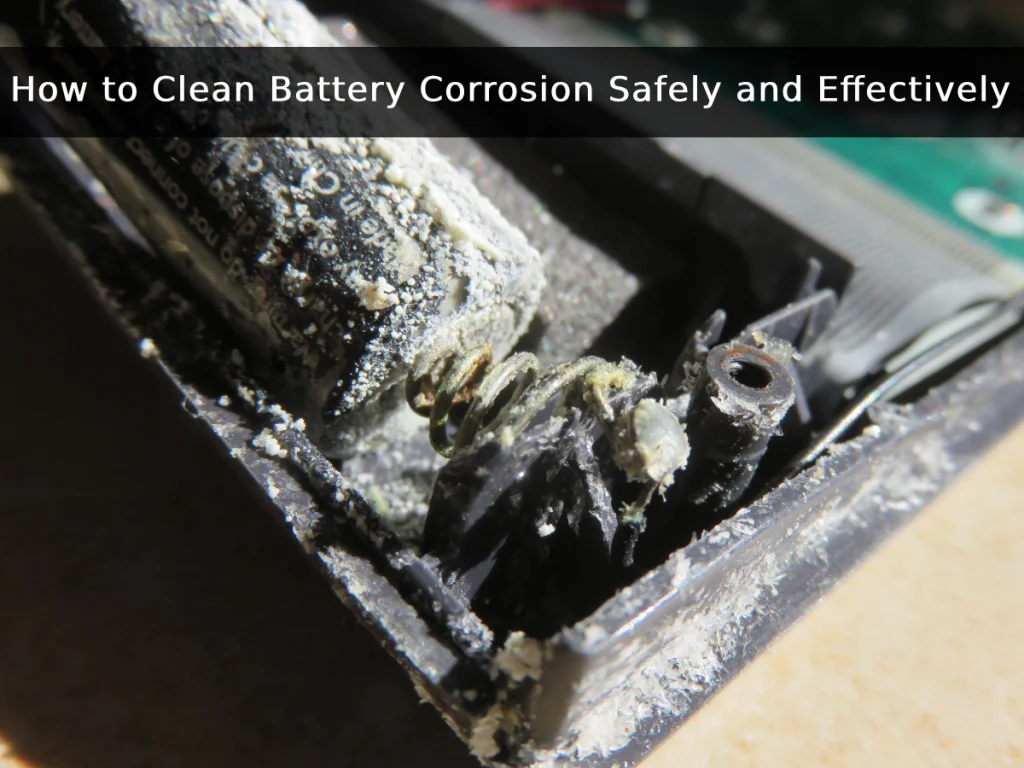
Have you ever opened the remote control for your TV, wall clock, or children’s toys, and suddenly found white or greenish powder stuck to the batteries? This is called battery corrosion. This problem occurs quite often, whether in small batteries such as AA, AAA, or in larger batteries
This corrosion not only causes devices to malfunction but can also shorten the battery’s lifespan. If left unchecked, it can even pose a safety risk. However, there is no need to be concerned about that, because there are easy and safe ways to deal with it. By knowing How to Clean Battery Corrosion, your devices can remain durable, and the batteries can last longer.
In this article, we will discuss the causes of corrosion and why it is dangerous to devices. We will also explain the steps for cleaning battery corrosion, tips to prevent it from reoccurring, and when it is better to replace the battery instead of cleaning it. Let’s dive in!
What Causes Battery Corrosion?
Before getting into how to clean battery corrosion, it is important to first understand what causes corrosion. Corrosion usually occurs due to a chemical reaction from the electrolyte fluid inside the battery that leaks out and comes into contact with air. It is this chemical reaction that causes white, green, or bluish powder to form around the ends of the battery.

Some common causes of battery corrosion include:
- Battery leakage
When a battery leaks, the electrolyte inside reacts with the air, causing corrosion. - High temperatures
High ambient temperatures can cause batteries to expand and eventually leak. - Battery age
If a battery has been used for a long time, the outer casing typically becomes brittle, making it more prone to leakage. - Improper battery use
Using a battery that is not compatible with the device can cause the battery to deteriorate quickly and become more susceptible to corrosion.
By understanding the causes, users can more easily prevent corrosion and know when to take immediate action to clean it. Learning how to clean battery corrosion at the right time also ensures that the device remains safe to use.
Is Battery Corrosion Dangerous?
After understanding the causes of corrosion, users may wonder whether corrosion is harmful to the device. The answer is that it can be quite dangerous. This is because the white or bluish powder that accumulates can interfere with the flow of electricity. Some of the risks include:

- First, corrosion can make the device difficult to turn on.
- Second, it can cause electrical problems because the current is blocked or disrupted, leading to unstable operation.
- Third, if the corrosion is not cleaned immediately, the terminals will erode and may render the battery unusable.
- Fourth, it can be dangerous to users because the liquid or powder from the corrosion can irritate the skin and eyes. If inhaled, it can disrupt breathing.
By knowing how to safely clean battery corrosion, users can extend the battery’s lifespan and protect the device from damage.
You might also find our article on lithium-ion battery safety
How to Clean Battery Corrosion
After learning about the dangers of battery corrosion, we now move on to the main discussion, which is how to clean battery corrosion. Cleaning battery corrosion is actually not difficult, but it must be done carefully.

Here are the steps:
1.Turn off and remove the battery
Before starting the battery cleaning process, the device must be turned off and the battery removed from its place.
2.Use personal protective equipment
Do not forget to use personal protective equipment such as goggles, a mask, and gloves.
3. Prepare the appropriate cleaning solution based on the battery type
To clean corrosion, you need a cleaning solution. However, since each battery has different characteristics, the solution must be tailored to the battery type.
- For alkaline batteries, such as AA, AAA, remote control, or wall clock batteries, use vinegar or lemon juice to neutralize the corrosion.
- For acid batteries, such as lead acid or small car batteries, use a mixture of baking soda and water to neutralize the corrosion.
Covered this in detail in Lithium vs Alkaline Batteries
4. Clean the affected area
Next, clean the corroded area using a small brush or cotton swab. Clean gently, because scrubbing too hard can damage the terminals.
5. Dry the area properly
After the residue has been removed, dry the area with a clean cloth. Then, to speed up the evaporation process, you can add a little isopropyl alcohol.
6. Reinstall or replace the battery.
The final step is to reinstall the battery into the device. However, if the battery is damaged, it is better to replace it with a new one.
Tips to Prevent Battery Corrosion
After users learn how to clean battery corrosion, the next step is to prevent the same problem from recurring. Prevention is very important because it makes the battery last longer, keeps its performance stable, and saves you the hassle of frequent cleaning.

Here are some simple tips you can follow to prevent corrosion from reappearing.
- Regularly check the condition of the battery terminals and clean them if there is any dust or dirt buildup.
- Apply petroleum jelly, special grease, or a thin protective layer to prevent moisture from causing white corrosion.
- Ensure that the battery cables or connectors are securely fastened and not loose.
- Avoid overcharging, as this can cause the battery to overheat and release gases that can trigger corrosion.
- If using a wet battery, do not forget to check the electrolyte fluid level to ensure it remains at the normal level.
With these simple tips, you can make your battery last longer and remain free from corrosion. So, you are not just learning how to clean battery corrosion, but also understanding how to prevent it and avoid the same issue in the future.
When to Replace the Battery Instead of Cleaning
Sometimes corrosion on batteries can still be remedied by cleaning, but there are also certain conditions where it is wiser to replace the battery altogether rather than wasting time. This is because if the battery is too damaged, cleaning it repeatedly will not yield maximum results. Here are some signs that indicate when a battery should be replaced.

- Severe corrosion. This is indicated by thick buildup covering most of the terminals, at which point cleaning is no longer sufficient.
- Batteries with cracked casings or leaking fluid should be replaced immediately as they can be hazardous.
- If the battery drains quickly or frequently fails to power the device due to reduced battery capacity.
- Batteries typically have a specific lifespan. After more than 3–5 years, performance typically begins to decline significantly.
If corrosion reappears shortly after cleaning, it is a sign that the battery needs to be replaced.
If you notice these signs, it is best to replace the battery with a new one. Therefore, users are not just focused on finding how to clean battery corrosion, but also on knowing when to stop cleaning and start investing in a new, safer, and longer-lasting battery
Looking more in our article on battery life cycle
Conclusion
Battery corrosion may look like a small issue, but it can actually stop devices from working properly. After learning how to clean battery corrosion, users will know the safe steps to clean the corrosion, starting from using the right cleaning fluid, personal protective equipment, to drying the terminals so that the battery can be used safely again.
Additionally, users can understand that prevention is far better than having to clean frequently. With simple maintenance tips and knowing when it is time to replace the battery, the battery lasts longer, the device runs smoothly, and there is no need to panic if white or greenish residue is found at the battery terminals.
FAQS
Yes, it does. White vinegar is acidic, so it works really well for neutralizing and cleaning battery corrosion, especially on alkaline batteries like AA or AAA. Just remember to use it carefully and always dry the area properly afterward.
The key is simple maintenance. Store your devices in a cool and dry place, check the batteries regularly, and avoid mixing old and new batteries. You can also apply a thin layer of petroleum jelly on the terminals to reduce the risk of corrosion coming back.
Yes, it is highly recommended. Battery corrosion can irritate your skin or eyes, so wearing gloves (plus goggles or a mask if possible) will keep you safe during the cleaning process. Safety first before anything else



 +86 – 18925002618